Create new moves
Get ideas with Explore
Mix a move with words like "backwards" or "tornado" to invent a new version, then save it to your library.
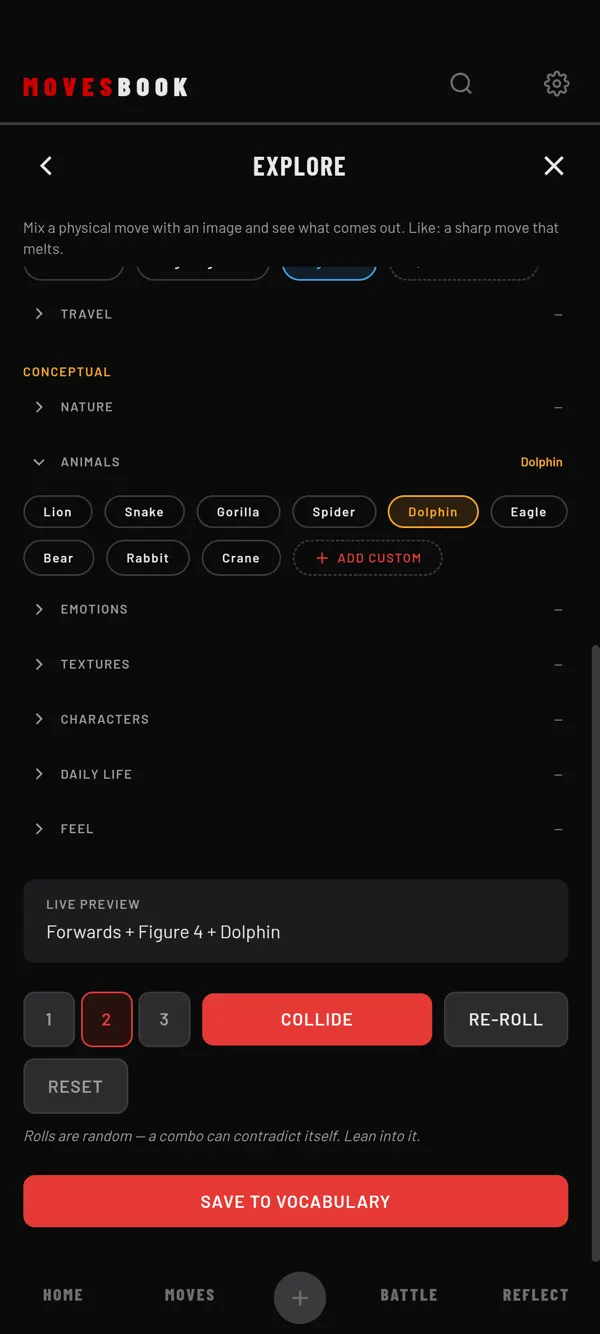
Steps
- Tap MOVES, then CREATE.
- Tap EXPLORE.
- Pick a mode (see below).
- Tap chips to build an idea, or tap RANDOMISE to let the app pick.
- Read the idea under LIVE PREVIEW, for example "Windmill + Slow motion + Tornado".
- Try the idea on the floor.
- Tap SAVE TO VOCABULARY when you like what came out.
- Check the name and the category, add notes if you want, and tap Save.
The four modes
- GROW FROM A MOVE: start from a move you know. You first pick it from your library.
- TECHNICAL: body chips like DIRECTION, LEVEL, SPEED, BODY FOCUS and TRAVEL. You pick one chip per group.
- CONCEPTUAL: one image, from groups like NATURE, ANIMALS, EMOTIONS or CHARACTERS.
- COLLIDE: a body chip and an image together. Here you draw with COLLIDE or RE-ROLL.
Outside Grow, picking a move is optional. Tap Pick a move, or type a name in the box. Skip both to explore freely.
Handy extras
- The buttons 1, 2 and 3 set how many body groups a draw fills.
- RESET clears everything.
- Add custom adds your own chip to a group.
- Press and hold a chip to remove it. The app's own chips are only hidden. The app says: "Bring it back in Settings › Moves."
Change the chips
- Open Settings (the gear, top right).
- Tap MOVES and scroll to EXPLORE CHIPS.
- Tap TECHNICAL or CONCEPTUAL to open its list. It shows how many chips are hidden.
- Tap the crossed-out eye to hide one of the app's chips. Tap ADD BACK to show it again.
- Tap the bin next to your own chip, then DELETE, to remove it for good.
RESET TO DEFAULTS shows all of the app's chips again. It does not touch your own chips.
Free limit
Building an idea by tapping chips is always free. Free users get 3 drawn ideas in any 24 hours. Each tap on RANDOMISE, COLLIDE or RE-ROLL counts as one. The EXPLORE tile shows the count, for example 1 OF 3 TODAY. When all 3 are used, the draw buttons show 3 OF 3 TODAY. Tapping one then opens the plans sheet. Each draw counts again 24 hours after you used it. Premium has no counter. See What's free and what Premium adds.
Where your move goes
- The new move is in VOCABULARY, with the idea as its description.
- If you picked a move, the new move is saved as a version of it, under BASED ON. You can change or clear it in the save window.
- The save also shows in REFLECT › SESSIONS, named after the mode, and in the day view of MY BOOK.
Last checked against app version 2.8.0.