Your moves
Connect a move's lineage
Link a move to the parent move it builds on, so your variations line up into family trees.
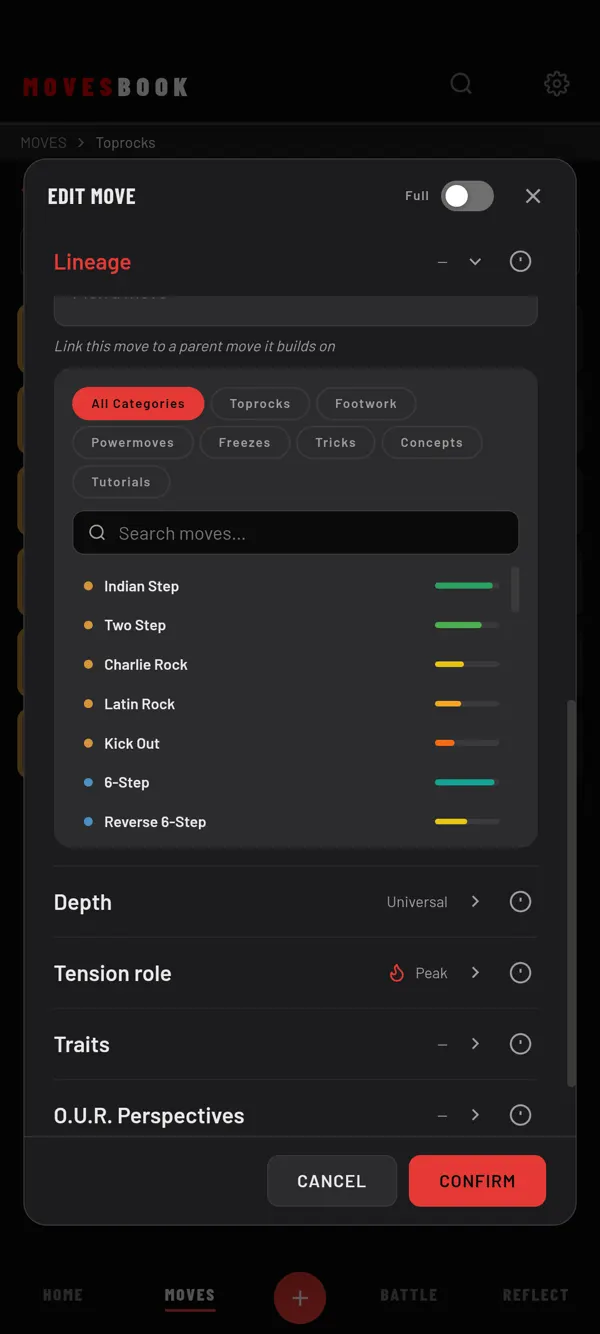
Many moves grow out of another move. A variation of a freeze, for example, is based on the freeze. Lineage records that link.
Steps
- Open the variation: tap it to open EDIT MOVE.
- Scroll to DETAILS and tap the Lineage row. In Simple mode, switch to Full first, or tick Depth under Settings › MOVES › Simple mode fields.
- Under BASED ON, tap Pick a move.
- Narrow the list with the category chips or Search moves….
- Tap the parent move. Its name now shows in the row.
- Tap CONFIRM.
To remove the link, open the Lineage row and tap ✕ next to the parent's name.
A move has one parent. A parent can have many variations.
See the result
Tap the view button in VOCABULARY until it shows TREE VIEW. The parent sits at the top, with its variations below it. See See your moves as a lineage tree.
Depth: how much of it is yours
The Depth row sits just below Lineage. Pick one:
- Universal: universal moves of your breaking vocabulary. This is the starting choice.
- My Version: the move exists, but your version is noticeably different.
- My Creation: you made it and have never seen anyone else do it.
In ALL MOVES, tap ⋯ (Tools) › Filter and use ORIGIN to show only one kind.
Last checked against app version 2.8.0.