Your moves
See your moves as a lineage tree
View your library as family trees, with each parent move above the variations that grew from it.
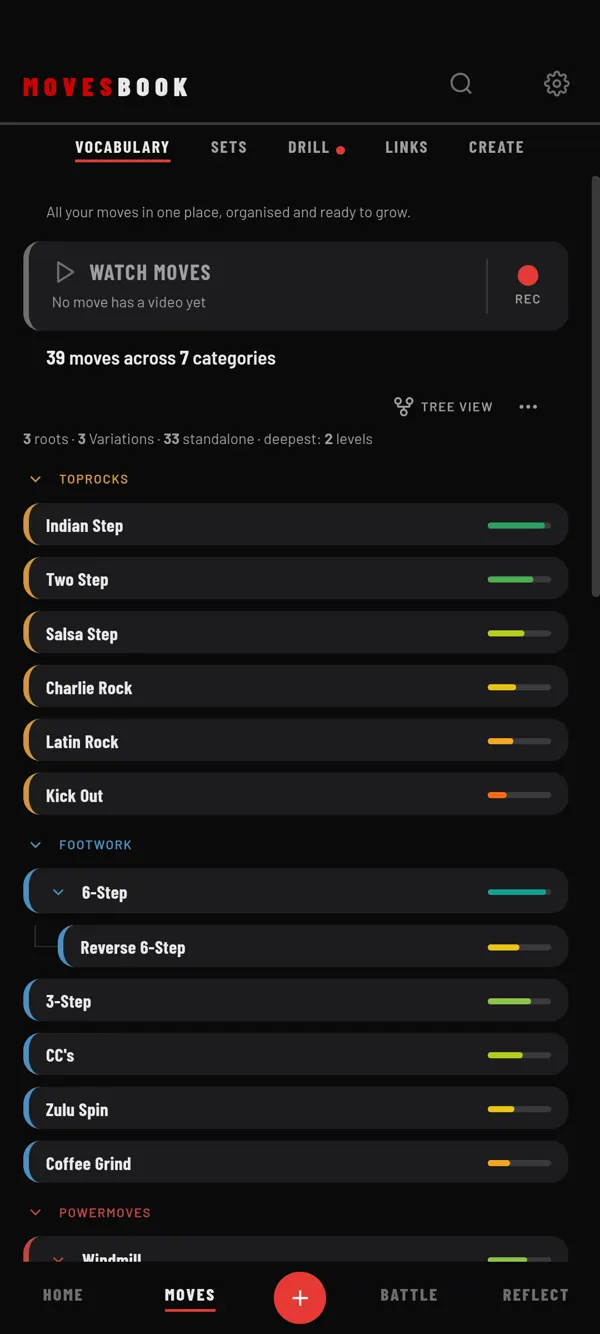
Steps
- Tap MOVES, then VOCABULARY.
- Tap the view button on the right until it shows TREE VIEW.
- Tap a category heading to fold it or open it.
- Tap ▸ or ▾ on a parent move to hide or show its variations.
- Tap any move to open EDIT MOVE.
What you see
The line at the top counts your library, for example "3 roots · 7 Variations · 20 standalone · deepest: 3 levels".
- A root is a move that has variations but no parent.
- A variation is a move linked to a parent.
- A standalone move has no parent and no variations. It shows as a plain row.
- Deepest is the longest chain from a root down.
Moves are grouped under their category, in your category order. Lines connect each parent to its variations.
To make the links, see Connect a move's lineage.
Last checked against app version 2.8.0.