Your moves
Write in a move's journal
Keep dated notes on a move, with a link or a video, to track how it changes over time.
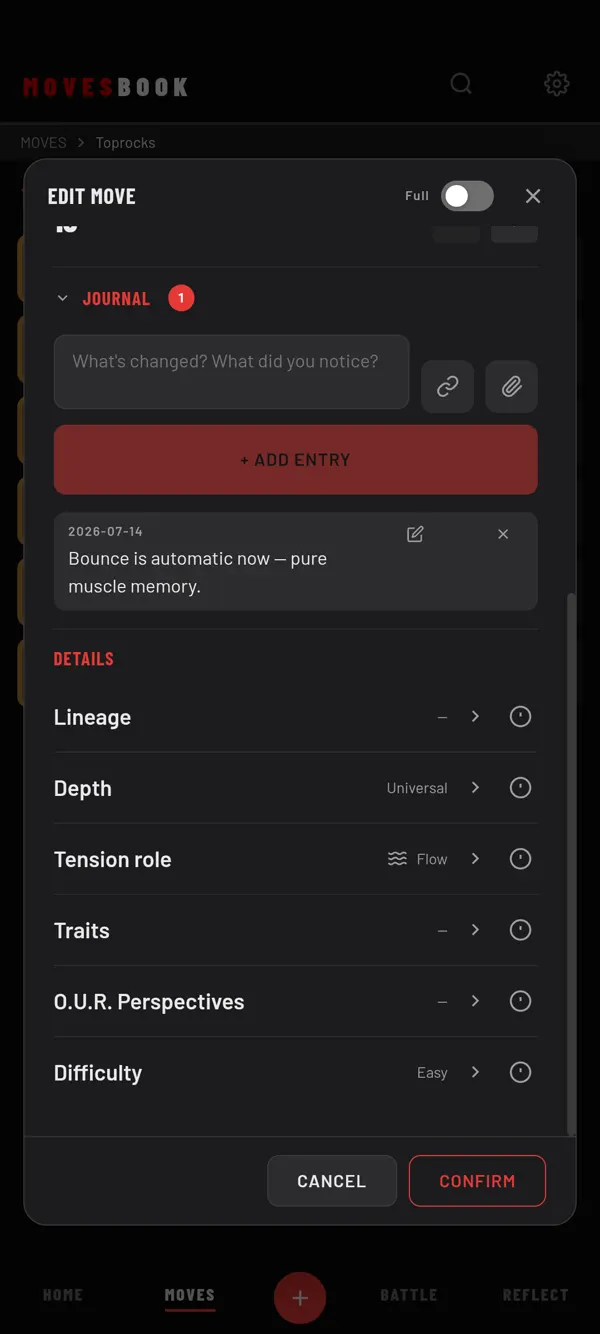
Steps
- Tap a saved move to open EDIT MOVE.
- Tap JOURNAL to open it. In Simple mode, switch to Full first, or tick Journal under Settings › MOVES › Simple mode fields.
- Type in "What's changed? What did you notice?".
- To add a link, tap the link button and paste it in VIDEO / REFERENCE LINK (optional).
- In the phone app, to add a video, tap the paperclip ("Attach video from phone").
- Tap + ADD ENTRY. The entry gets today's date.
- Tap CONFIRM to save the move.
The number next to JOURNAL shows how many entries the move has.
Edit or delete an entry
- Tap the pencil on an entry, change it, then tap SAVE.
- Tap the bin to delete it. The app asks first, because the entry and its video are deleted from this device for good.
Then tap CONFIRM on the move.
Last checked against app version 2.8.0.