Your moves
Explore links between moves
Find out which of your moves flow into each other, shortlist links to try, and save the ones that work.
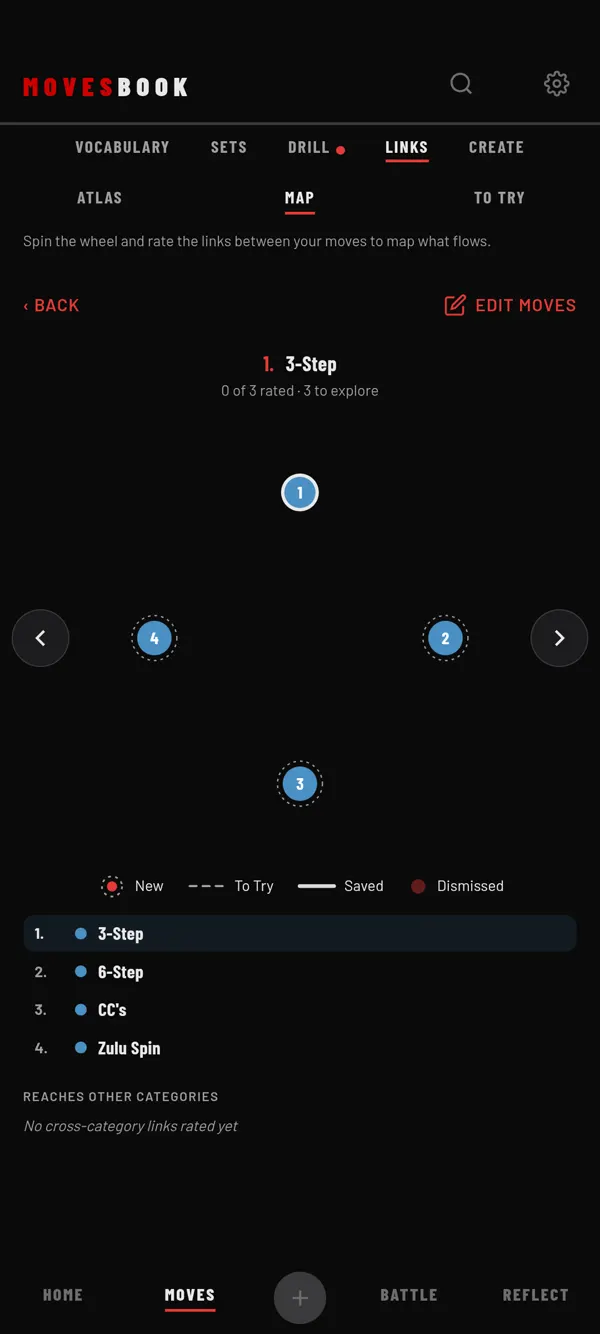
LINKS has three views: ATLAS, MAP and TO TRY.
Pick moves in ATLAS
- Tap MOVES, then LINKS, then ATLAS.
- Look at COVERAGE. It shows how many links you have rated so far.
- Open a category and tick 2 to 16 moves. The moves with the fewest links come first.
- Tap OPEN THE WHEEL · 5 MOVES (the number matches your picks).
Rate links on the wheel
The wheel opens in MAP. The move at the top is the one in focus.
- Turn the wheel with the arrows, or tap a move in the list below to focus it.
- Tap another move on the wheel to mark "focus move → that move" as To Try. Tap again to clear it.
The key shows each line: New, To Try (dashed), Saved (bold) and Dismissed. Tap EDIT MOVES to change the moves on the wheel.
Test and save in TO TRY
- Tap TO TRY. Each card is one link, like "Windmill → Freeze".
- Tap a card and pick a transition word, or add your own.
- Tap SAVE. The move form opens, filled in as "A → B".
- Tap CONFIRM.
The link is saved as a move in the category MAP Transitions and shows as a bold line on the wheel. Tap DISMISS instead to drop an idea.
Free and Premium
Atlas, the wheel and To Try are free. Free accounts can keep 5 saved links. The top of LINKS counts them, like "3 of 5 links saved". Saving a 6th link opens the plans sheet. Editing a saved link is always free, and deleting one frees a place. With Premium or the free trial, there is no counter. See the pricing.
Last checked against app version 2.8.0.