Your moves
Keep moves fresh with Execution Decay
See how a move's level slowly drops when you stop training it, and choose how fast it happens.
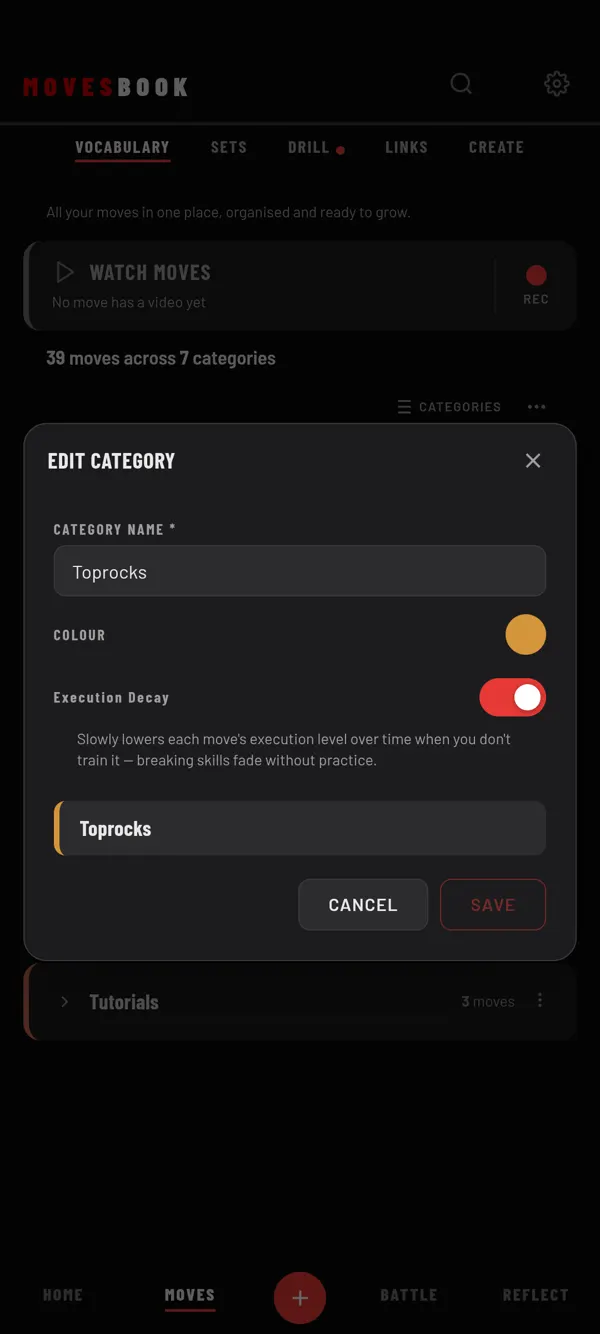
Breaking skills fade without practice. Execution Decay shows that in your library. The level you set is never changed. Tiles just show a lower level until you train the move again.
How it works
- The clock starts on the last day you trained the move. Logging reps counts, for example with + under Total Reps, in COUNT mode or in a Drill session.
- Nothing drops during a grace period. Its length depends on the move's Difficulty (see the table).
- After that, the level drops a little every 2 days. It never goes below 0.
- Train the move again and the clock starts over. The tile shows your full level again.
| Difficulty | Grace period |
|---|---|
| Easy | 45 days |
| No difficulty or Intermediate | 30 days |
| Advanced | 21 days |
A move you have never trained does not fade.
Choose the speed
- Open Settings (the gear, top right).
- Tap BEHAVIOUR.
- Under Execution Decay, pick Off, Gentle, Normal or Aggressive.
Normal is the starting choice. It takes 1% off every 2 days. Gentle is half as fast. Aggressive is 1.5 times as fast. Off stops decay everywhere.
Turn it off for one category
- Tap the view button until it shows CATEGORIES or TILES.
- On a category card, tap ⋯, then Edit.
- Turn off Execution Decay.
- Tap SAVE.
Moves in that category never fade.
Last checked against app version 2.8.0.