Create new moves
Restore, remix or rebuild a move
Pick a move, get a creative task for it, set a timer if you like, and log what came out.
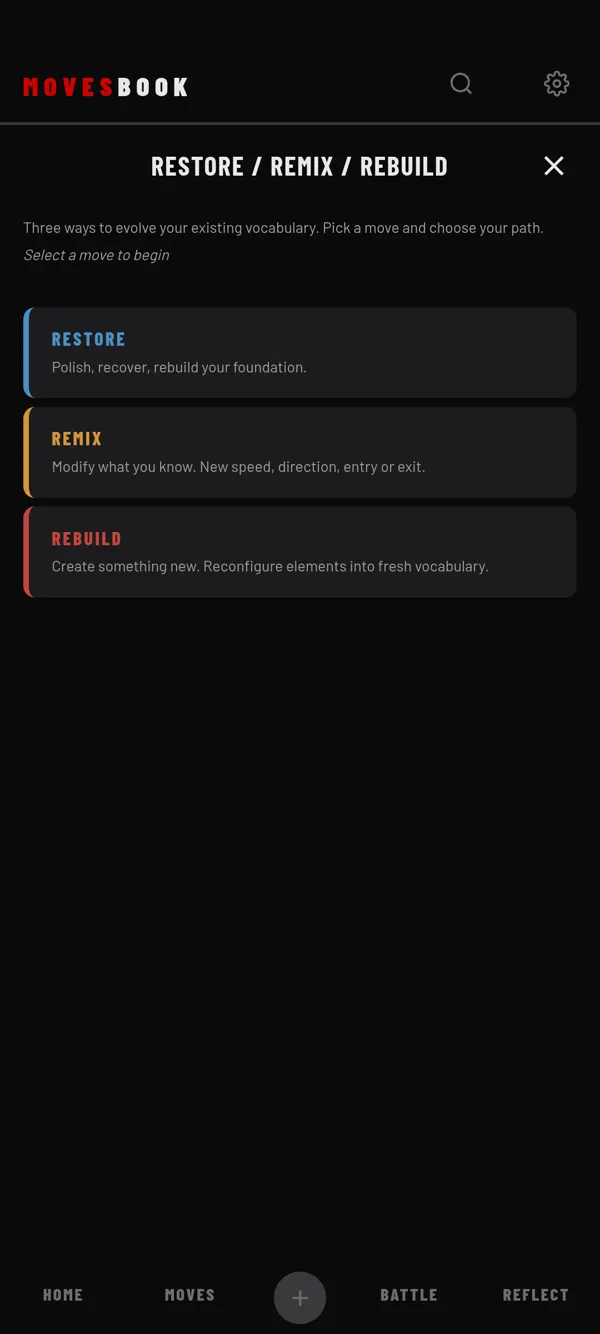
Steps
- Tap MOVES, then CREATE.
- Tap RESTORE / REMIX / REBUILD.
- Pick a mode: - RESTORE: "Polish, recover, rebuild your foundation." - REMIX: "Modify what you know. New speed, direction, entry or exit." - REBUILD: "Create something new. Reconfigure elements into fresh vocabulary."
- Tap a move in the list, or type a name in the box at the bottom.
- Tap the big button at the bottom. It shows the mode's name, for example REMIX.
- Read your task. For example: "Take Six Step and create 3 versions by changing entry, speed, or exit".
- Work on it. Tap DIFFERENT PROMPT if you want another task.
- Tap DONE.
- Write how it went, if you want.
- Tap SAVE & CLOSE. You see "Session logged".
Set a timer
On the task screen, tap TIMER. Then pick 1 MIN, 3 MIN, 5 MIN or 10 MIN. CUSTOM lets you type the minutes and tap GO. NO LIMIT counts up instead. When a countdown ends, the phone beeps, vibrates and shows TIME'S UP.
Save a new move
After DONE, the screen asks "Did you create a new move?". Tap ADD A MOVE to open the move form. If you picked a move from your list, the new move is already linked to it. After you save, you can add another.
Free limit
Free users get 1 run in any 24 hours. The run counts when you tap the mode button in step 5. DIFFERENT PROMPT inside the run is free. The tile shows 0 OF 1 TODAY before you start. After your run, the button shows 1 OF 1 TODAY. Tapping it then opens the plans sheet. The run counts again 24 hours after you started it. Premium has no counter. See What's free and what Premium adds.
Where it shows later
- REFLECT › SESSIONS, named after the mode and the move, for example "REMIX — Six Step".
- The day view of MY BOOK, under EVENTS, with "via Restore/Remix/Rebuild".
Your notes and the task are saved with it. So is the time, if you used the timer.
Last checked against app version 2.8.0.