Account, backup & privacy
Delete your account
Erase your MovesBook account and all its training data, from this device and from the cloud.
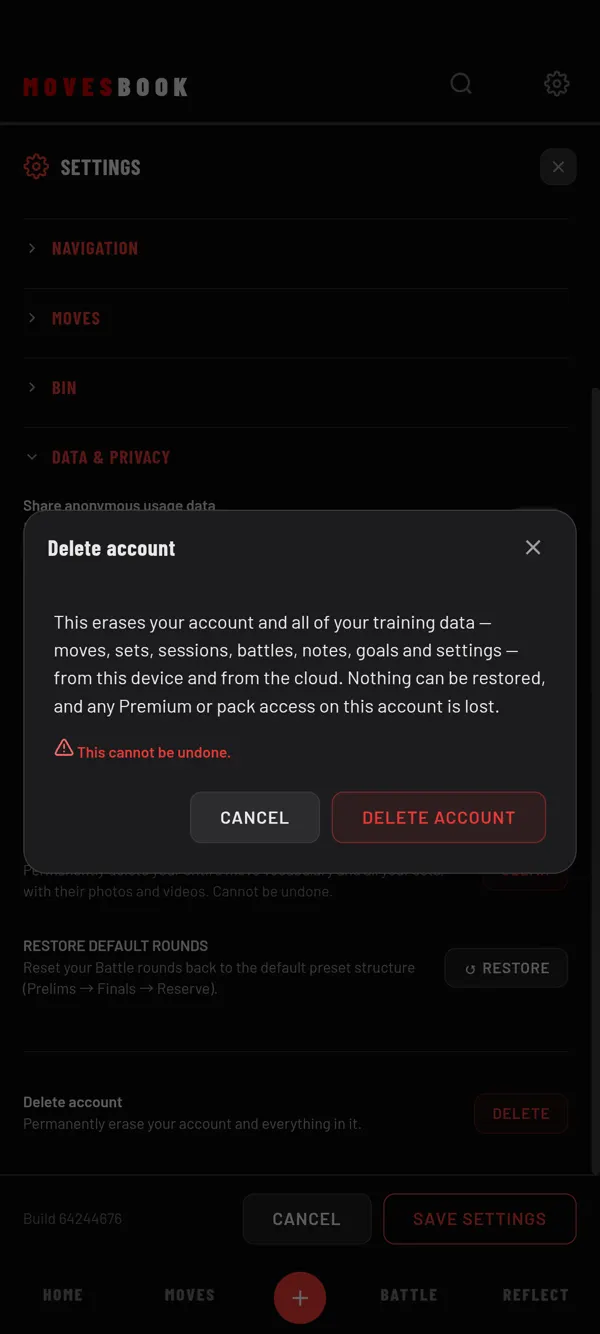
Steps
- Tap the gear icon at the top right. SETTINGS opens.
- Tap DATA & PRIVACY to open it.
- Scroll to the last row, Delete account.
- Tap DELETE.
- Read the message in the Delete account window.
- Tap DELETE ACCOUNT. The button shows DELETING… while it works.
When it is done, you are signed out and the app restarts on the sign-in screen.
To stop, tap CANCEL instead. Nothing changes.
What the app deletes
The app says this erases your account and all of your training data. That means moves, sets, sessions, battles, notes, goals and settings. They are erased from this device and from the cloud.
The app also says:
- Nothing can be restored.
- Any Premium or pack access on this account is lost.
- This cannot be undone.
If it does not work
You see: "Your account was not deleted and nothing was changed." Check your internet connection and try again.
Before you delete
Want to keep your training? Make a backup file first. You can restore it later without an account. See Back up your MovesBook.
For how MovesBook handles account deletion, read the Privacy Policy. You can also see the account deletion page on our website.
Last checked against app version 2.8.0.