Account, backup & privacy
Choose what you share
Turn anonymous usage data on or off, and see where MovesBook asks before it shares anything.
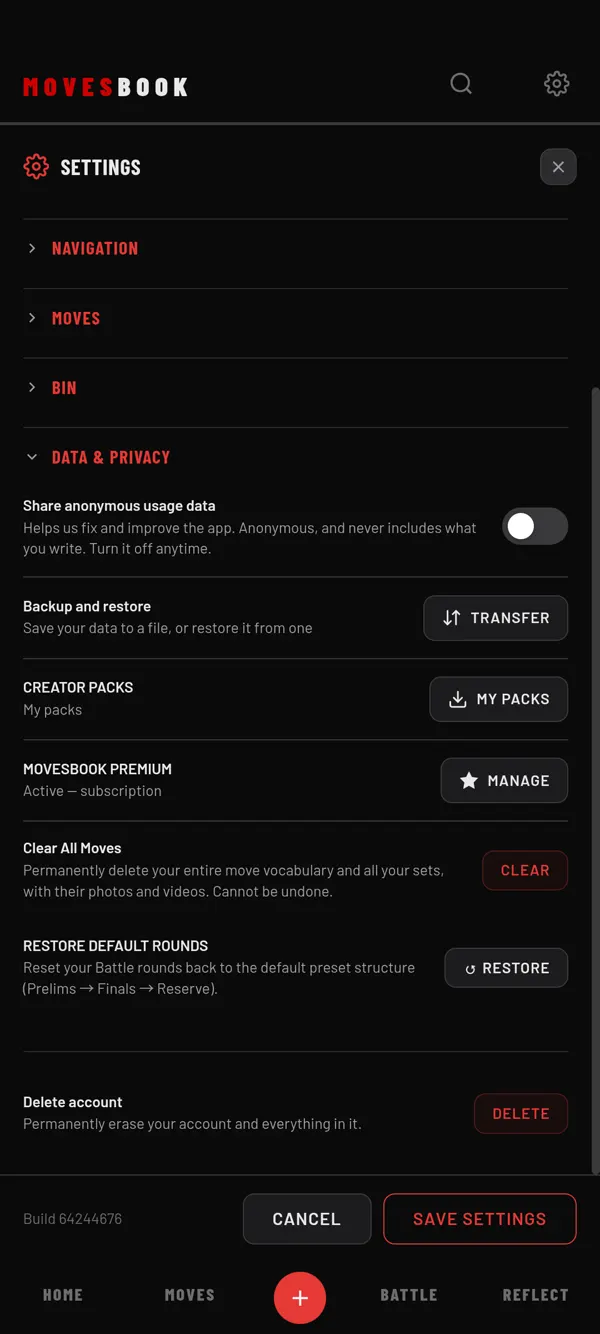
Steps
- Tap the gear icon at the top right. SETTINGS opens.
- Tap DATA & PRIVACY to open it.
- Find Share anonymous usage data, the first row.
- Tap the switch to turn it on or off.
The change works at once. Tap SAVE SETTINGS or the X to close.
What the switch does
The app describes it like this: "Helps us fix and improve the app. Anonymous, and never includes what you write."
- It is off until you turn it on.
- You can turn it off again at any time.
- Nothing is sent when you use MovesBook without an account, even with the switch on.
- Nothing is sent while a Send to teacher screen is open.
When you are signed in, your settings sync, so the switch follows your account to your other devices.
Other places the app asks first
- Feedback: your email is only added if you tick You can reply to me by email. The box starts unticked every time.
- Send to teacher: you tick what to send and see exactly what goes before you send it. See Send your training to your teacher.
Your videos, photos and audio are never uploaded. See What stays on your phone.
Read the legal pages
In the app, tap your avatar, then scroll to LEGAL. It has four pages: Privacy Policy, Terms of Service, Disclaimers and Attributions. Tap one to read it.
You can also find the first three with Search. Type, for example, "privacy" or "terms". See Search MovesBook.
For anything legal, read the Privacy Policy on our website.
Last checked against app version 2.8.0.