My Book & progress
Find old notes and put them back on HOME
- Free
Read your archived notes, goals, targets and healed injuries in My Book, and add a new note about one to HOME.
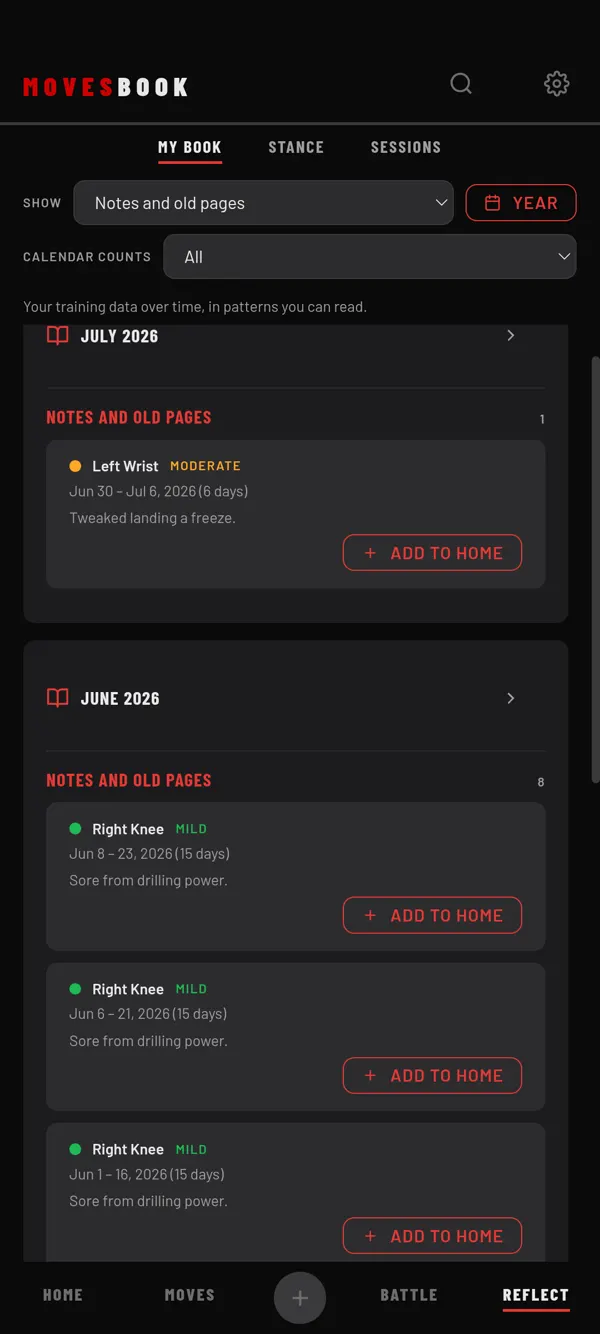
Find your old pages
- Tap REFLECT, then MY BOOK.
- Tap the SHOW picker.
- Choose Notes and old pages.
Now you only see months that hold old pages. Each one sits in the month it was put away.
You see:
- Archived notes, goals and targets from HOME, with their title, date and text.
- Healed injuries, with the body part, MILD, MODERATE or SEVERE, the dates and how many days it lasted.
Old pages with no date are at the very end, under PAGES WITH NO DATE.
Put one back on HOME
- On an old page, tap ADD TO HOME.
- A note opens, called Add a Note to HOME. Its title is filled in for you, for example "Archived note: …".
- Add any text you want.
- Under Show the idea on the:, pick a date. A date is needed before you can save.
- Tap SAVE.
A new note appears on HOME on that date.
Last checked against app version 2.8.0.