Your day on HOME
Add a note to your day
- Free
Put a note on HOME for today or any date, with an optional link or video, and pin it when you want to keep it in view.
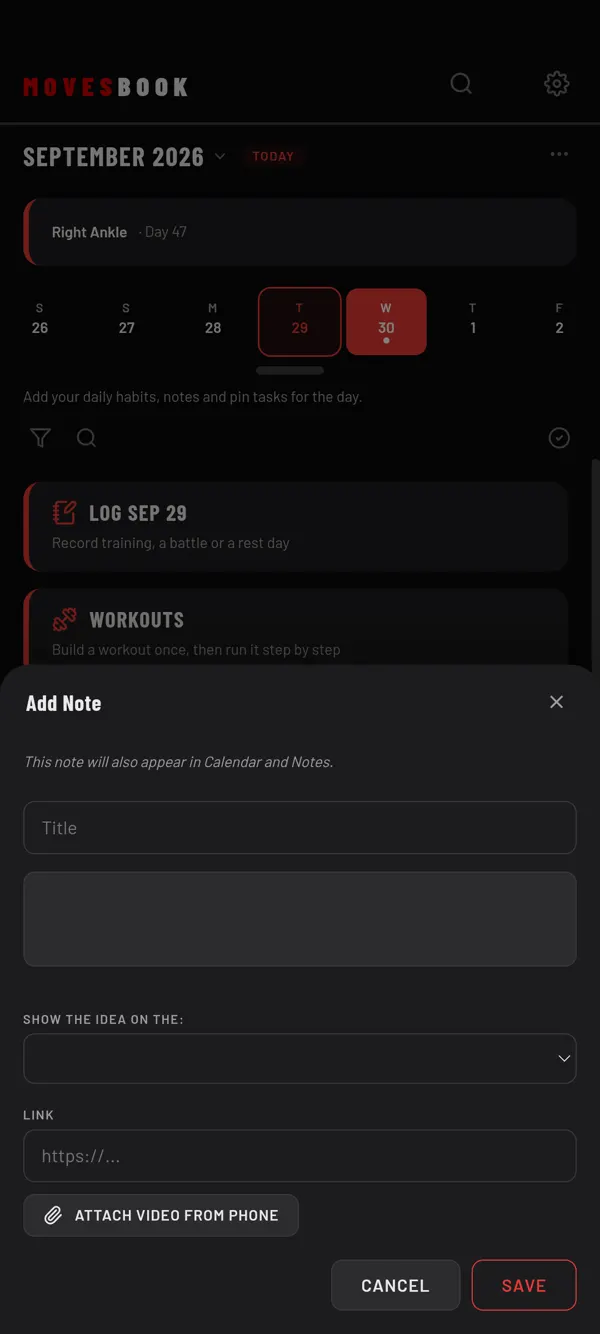
Steps
- On HOME, tap +.
- Tap Add Note.
- Type a title and your note.
- Under SHOW THE IDEA ON THE:, pick the day the note is for. If you leave it empty, the note is for today.
- If you like, paste a link under LINK.
- On the phone app, you can also tap ATTACH VIDEO FROM PHONE.
- Tap SAVE.
Where your note shows
The note shows under TODAY on the day you picked. It does not show before that day. On later days it is not listed, unless you pin it.
To keep it in view today, tap ⋯ › Pin to top on the tile. The note moves to NOTES for today. Tap ⋯ › Unpin to take it off.
On the tile, tap Link to open the link. A video link plays in a small window over HOME. A video from your phone shows as Video on this device.
Tidy up
- ⋯ › Edit opens EDIT NOTE.
- ⋯ › Archive takes the note off HOME and keeps it in My Book. You see Moved to History. See Find old notes and put them back on HOME.
Last checked against app version 2.8.0.