Your day on HOME
Set a goal
- Free
Add a milestone to work toward, like landing a clean air flare, and keep a journal of how it goes.
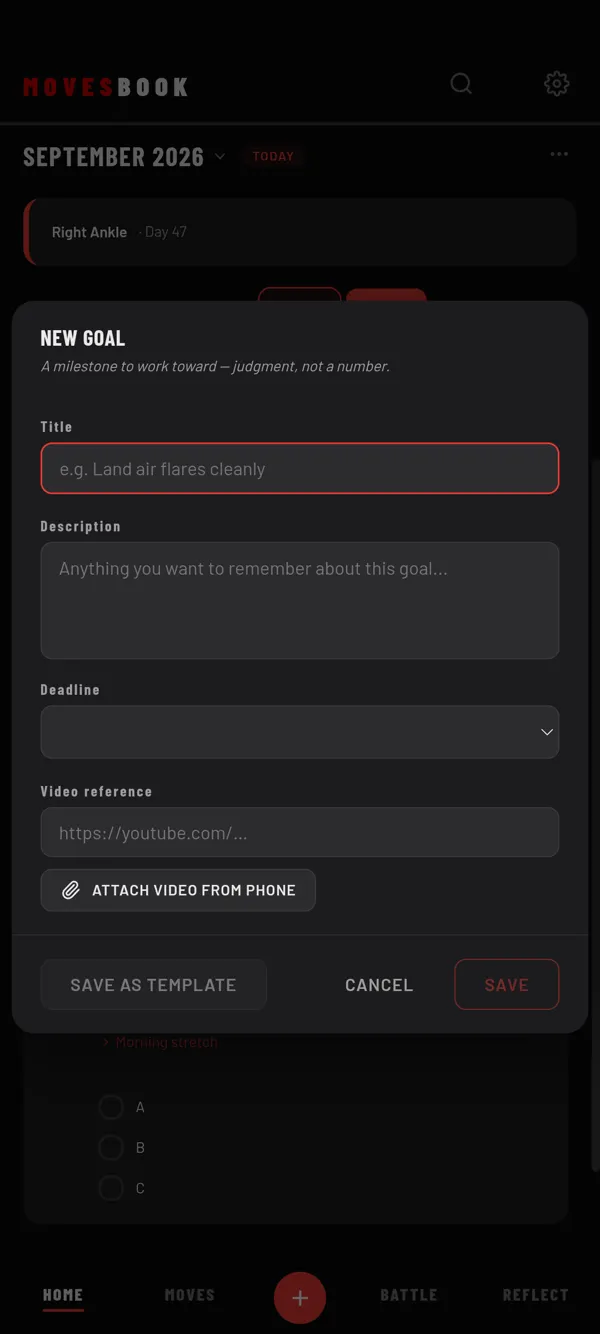
Steps
- On HOME, tap +.
- Tap Add Goal / Target, then NEW GOAL.
- Type a Title, for example "Land air flares cleanly". The title is required.
- If you like, add a Description, a Deadline and a Video reference link.
- On the phone app, you can also tap ATTACH VIDEO FROM PHONE.
- Tap SAVE.
Your goal shows under GOALS on HOME, on every day. The deadline shows on the tile as a date.
Keep a journal
- Tap the goal's title on its tile. The goal opens on JOURNAL.
- Write under TODAY'S NOTE. You can add a link too, or a video on the phone app.
- Tap + ADD ENTRY.
- Tap SAVE.
Each entry is dated today. To change the goal itself, tap the GOAL tab.
When you reach it
A goal has no "done" button. When you are finished with it, tap ⋯ › Archive on the tile. You see Moved to History. The goal leaves HOME and waits in My Book. See Find old notes and put them back on HOME.
Last checked against app version 2.8.0.