Your day on HOME
Save a routine as a template
- Free
Save a habit, goal or target as a template, then start new ones from it in a few taps.
Steps
- On HOME, tap +, then Add Habit. Or open a habit you have with ⋯ › Edit.
- Fill in the habit: name, steps, time of day and repeat.
- Tap SAVE AS TEMPLATE. You see Template saved. The form stays open.
- Tap SAVE if you also want this habit on HOME.
Start a habit from a template
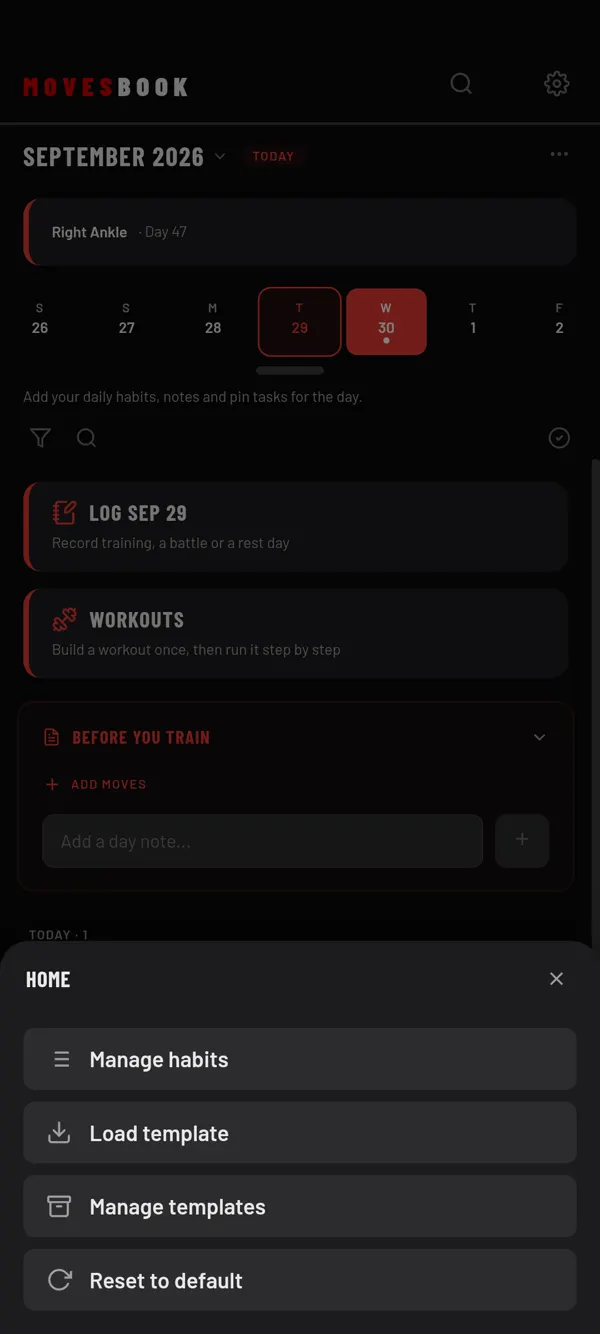
- On HOME, tap ⋯ at the top right. The HOME sheet opens.
- Tap Load template.
- Tap a template. A filled-in NEW HABIT form opens.
- Change what you like, then tap SAVE.
Nothing is added to HOME until you tap SAVE.
What a template keeps
A habit template keeps the name, steps, time of day, repeat and timer. Web links on steps stay too.
It does not keep photos or videos on steps, the linked workout or AT A SET TIME.
Goals and targets
NEW GOAL, NEW TARGET and their edit screens also have SAVE AS TEMPLATE. The deadline is saved as a number of days. When you load the template, the deadline is set that many days from today.
Change or delete a template
- On HOME, tap ⋯, then Manage templates.
- Tap the pencil to change a template, or the bin to delete it.
- To delete, confirm with DELETE.
Last checked against app version 2.8.0.