Your day on HOME
Set a number target
- Free
Pick a number to hit, like 20 new moves or 30 sessions, and count up on HOME with one tap.
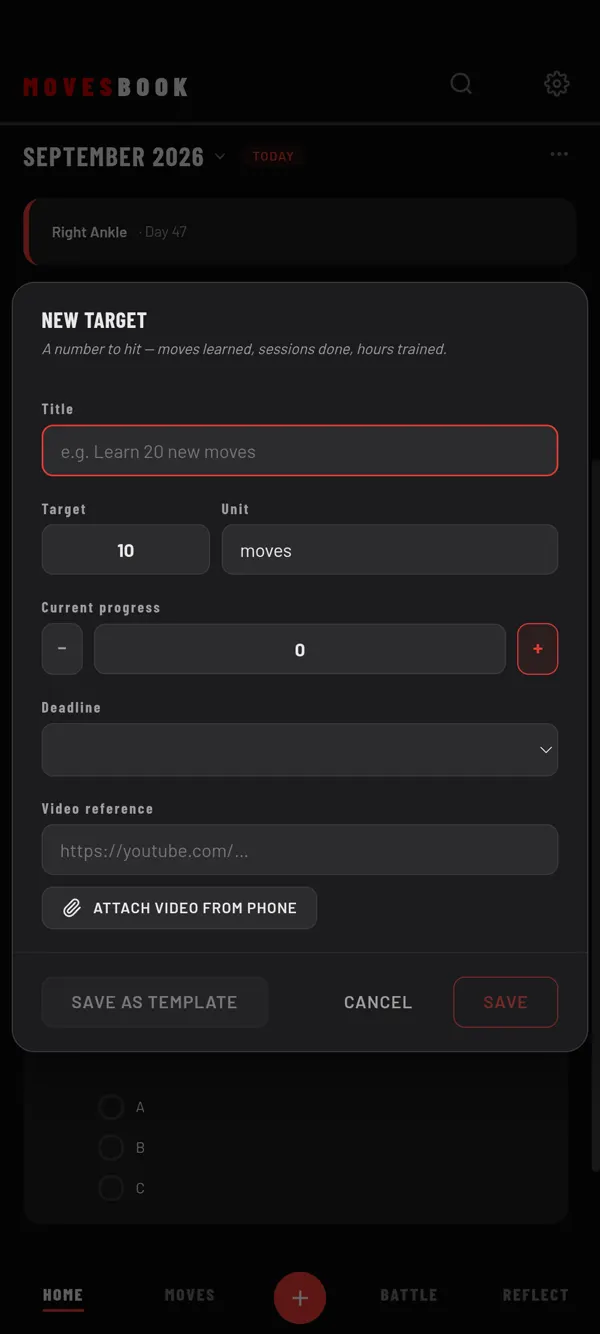
Steps
- On HOME, tap +.
- Tap Add Goal / Target, then NEW TARGET.
- Type a Title, for example "Learn 20 new moves". The title is required.
- Set the Target number. It starts at 10.
- Set the Unit. It starts as "moves". You can type sessions, hours or anything else.
- If you have already started, set Current progress.
- If you like, add a Deadline and a Video reference link.
- Tap SAVE.
Your target shows under GOALS on HOME, on every day.
Count your progress
The tile shows your count, for example 4 / 20, and a progress bar.
- Tap + on the tile to add one.
- To go down, tap ⋯ › Edit, then the TARGET tab. Change Current progress and tap SAVE.
The count only changes when you change it. MovesBook does not count your training into it.
Keep a journal
- Tap the target's title on its tile. It opens on JOURNAL.
- Write what you did, then tap + ADD ENTRY.
- Tap SAVE.
When you reach it
When the count reaches the target, My Book marks the day. Open that month in REFLECT › MY BOOK and look under STAMPS. See Read your training record in My Book.
When you are done with it, tap ⋯ › Archive. It leaves HOME and waits in My Book.
Last checked against app version 2.8.0.