Your day on HOME
Check in before you train
- Free
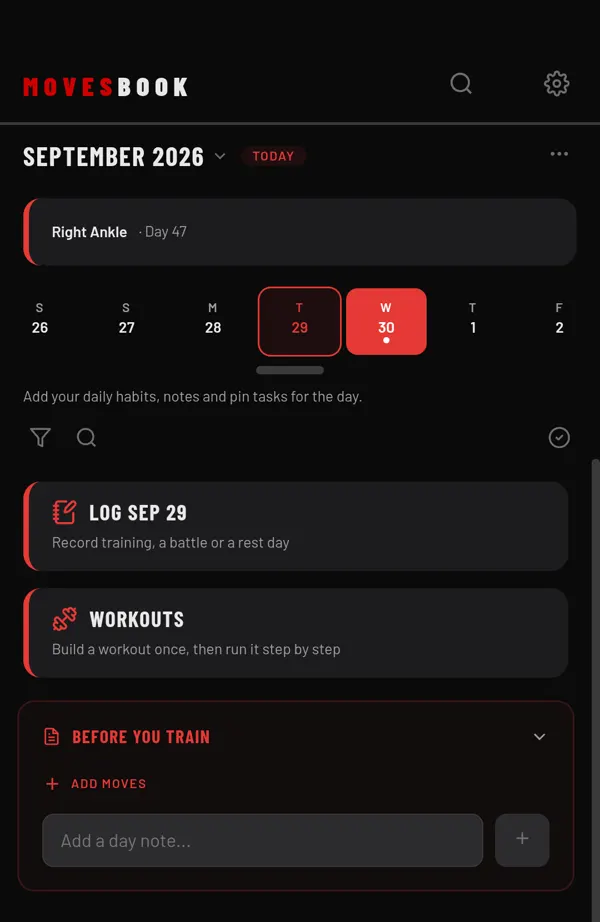
Use BEFORE YOU TRAIN on HOME to list moves you want to try and jot down notes for the day.
Steps
- On HOME, find BEFORE YOU TRAIN, under the tiles at the top.
- Tap ADD MOVES.
- Tick the moves or sets you want to try, then tap DONE. They show under WANT TO TRY.
- When you have tried one, tick it.
- To add a note for the day, type in Add a day note... and tap +. You see Note saved.
How each part works
- WANT TO TRY is one list, the same on every day. Tap a name to open the move or set. Tap × to take it off the list.
- Ticking an item adds "Tried" and its name to the day you have open on HOME. Unticking takes it away again.
- DAY NOTES belong to one day only. Tap the pencil to change a note, or × to delete it.
- Tap BEFORE YOU TRAIN to fold the panel away. It stays folded on this phone until you tap it again.
Notes from your last session
With Premium or the free trial, the app asks Note for next time? and Anything to film and review? when you finish a session. Your answers appear here under FROM LAST SESSION and FROM FOOTAGE REVIEW, from the date you chose. See Leave a note for your next session.
Tap the pencil next to one of these notes to change it, or × to clear it.
Last checked against app version 2.8.0.