Battles
Use Battle Mode and Battle View
- Free
Read your battle plan at the jam. Battle Mode makes it large and lets you mark rounds as used. Battle View fills the screen.
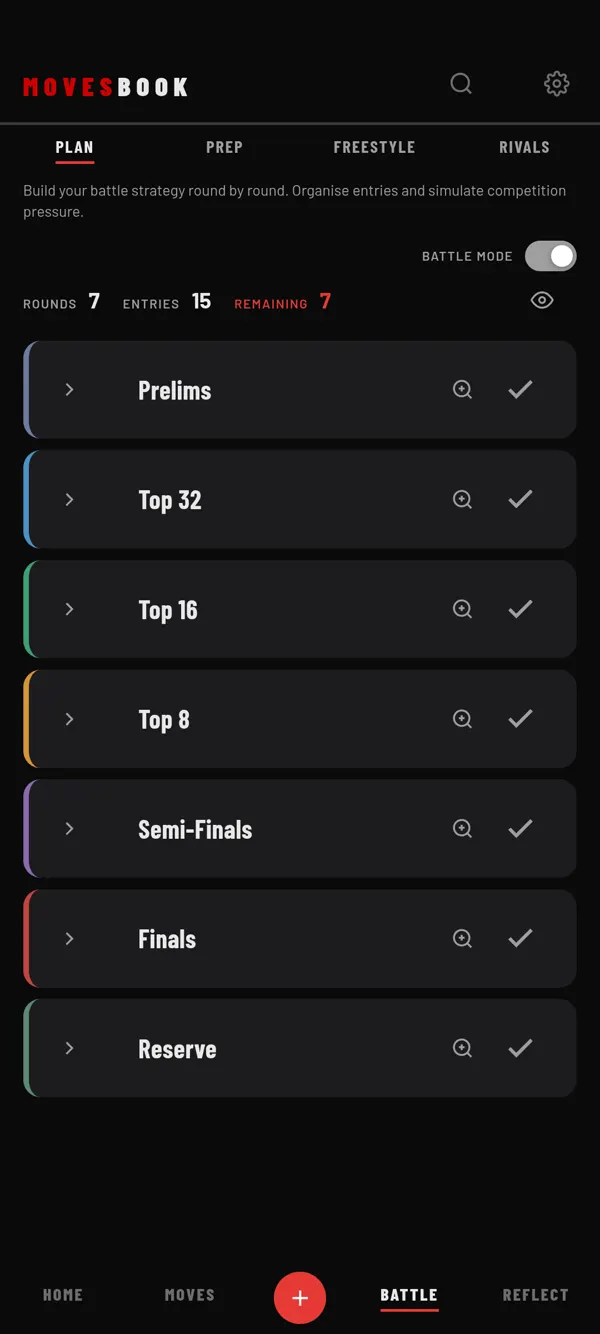
Battle Mode
- Tap BATTLE, then PLAN.
- Turn on the switch at the top right. Its caption changes from EDIT to BATTLE MODE.
- Tap the check button on a round after you danced it. The round is marked USED and dimmed.
- Read REMAINING at the top. It counts the rounds not yet used.
- Tap a round's name to make it bigger. Tap it again to make it normal.
- Turn the switch off to go back to EDIT.
In Battle Mode everything is larger. You cannot edit, delete or reorder rounds. The template buttons and SIMULATE COMPETITION are hidden.
A USED mark counts for today only. The next day every round starts fresh. Battle Mode itself is remembered on this device.
Battle View
- On PLAN, tap the eye icon at the top right.
- Battle View opens on the first round not marked USED today.
- Swipe left or right anywhere to go to the next or previous entry. You can also tap the entry buttons at the top.
- Tap ✕ to close.
Battle View shows each move in big text with its category colour. A set shows only its name. Text shrinks by itself so an entry fits without scrolling. The screen stays on while it is open, where the phone allows it.
Change the text size
Open Settings, then BEHAVIOUR. Under Battle view text size, pick Small, Medium or Large. This is the largest size. Long entries still shrink to fit.
Last checked against app version 2.8.0.