Battles
Prepare for a battle with a plan
Build a training plan that counts down to your battle, with phases, training days, the moves to work on and a checklist for every day.
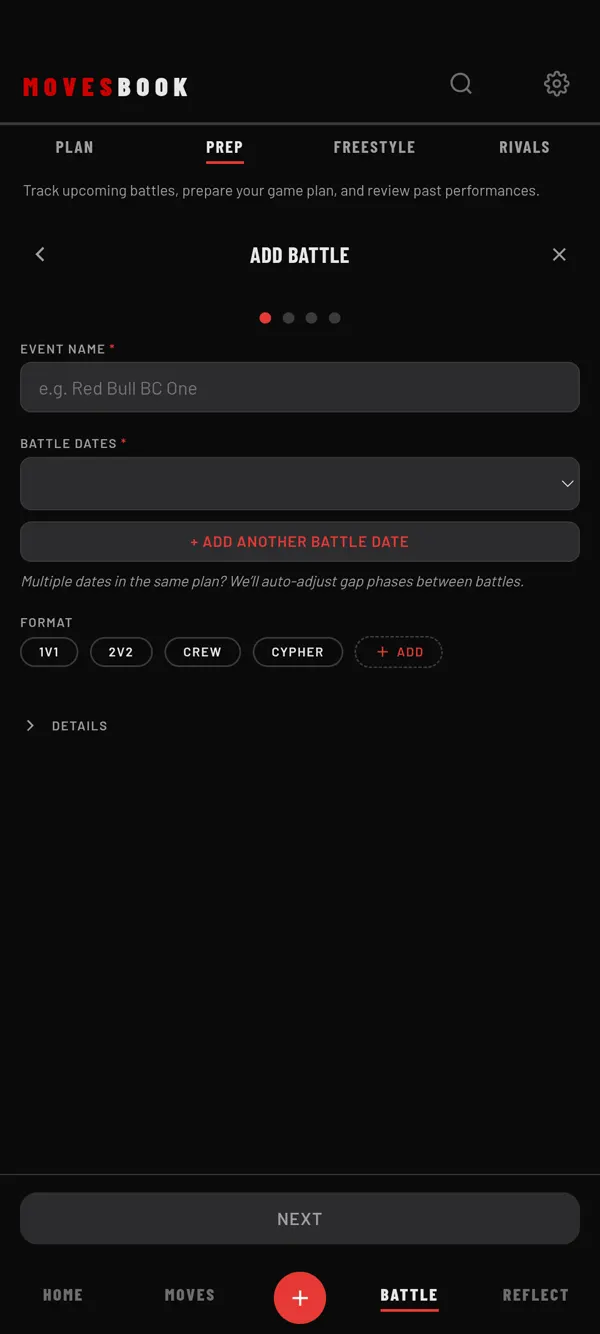
Steps
- Tap BATTLE, then PREP.
- Tap +, then New plan.
- ADD BATTLE: type the EVENT NAME and pick a date under BATTLE DATES. Format, link, location and judges are optional. Tap NEXT.
- CHOOSE YOUR APPROACH: tap SHORT (1–2 weeks), MEDIUM (3–4 weeks), LONG (5+ weeks), METHOD or BLANK. Your own templates show here too. Tap NEXT.
- DEFINE YOUR PHASES: name each phase and give it a share. The TOTAL must be 100%. Tap the days under TRAINING DAYS. Tap NEXT.
- SELECT YOUR ARSENAL: pick the moves and sets to train. You can also add them later. Tap GENERATE PLAN.
- Check the PLAN SUMMARY and tap START PLAN.
Use the plan
Tap the plan card to open it. You see the phases, then one row per day. Tap a day to open its page:
- WATCH ARSENAL plays the plan's moves. On a training day, START SPAR and START COMP SIM start a session with the plan's moves.
- Tick the day's checklist. To add an item, type it and pick THIS DAY ONLY, EVERY TRAINING DAY or EVERY REST DAY.
- ARSENAL READINESS shows each move and when you last trained it.
Swipe the date, or tap ‹ ›, to step to another day. While a plan runs, HOME shows a tile for it. Tap it to open today's page.
EDIT PLAN changes the name, dates, training days, moves and phases. OVERVIEW shows your progress.
Free and Premium
Free keeps 1 active plan. The counter shows 1 OF 1 ACTIVE PLAN. Starting a second plan opens the plans sheet. So do SAVE AS TEMPLATE, BATTLE HISTORY and opening a past battle's result. Premium has no limit. See plans and pricing.
Last checked against app version 2.8.0.