Battles
Add battle videos round by round
- Free
Attach the footage of each round to the battle: a link on any device, or a video or photo from your phone.
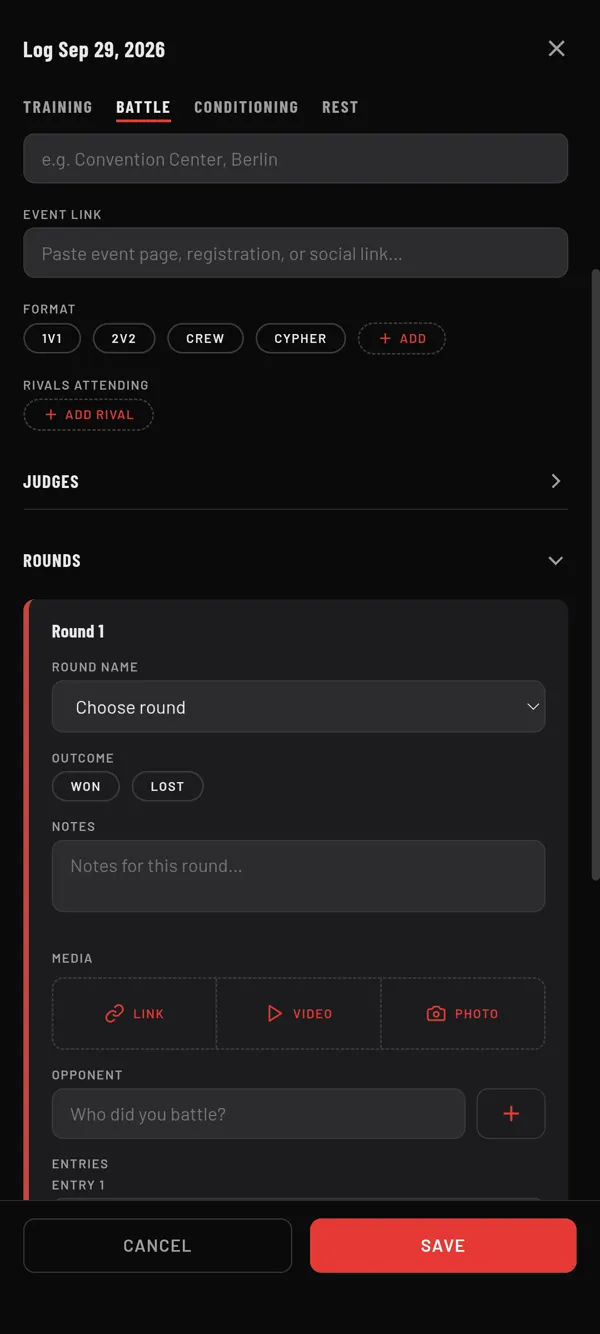
Steps
- Open the battle form. On HOME, tap +, then Log Today, then BATTLE. For a saved battle, tap its tile on HOME, then EDIT BATTLE.
- Open ROUNDS and find the round. Tap ADD ROUND if it is not there yet.
- Under MEDIA, tap LINK, VIDEO or PHOTO.
- For a link, paste the address into the new row. For a video or photo, pick it on your phone.
- Repeat for the other rounds.
- Tap SAVE.
Link, video or photo
- LINK works everywhere: phone app and web app. Add as many links as you like.
- VIDEO and PHOTO show on the phone app only. MovesBook keeps its own copy on this phone.
When the app can play a link, its row shows a play button and the video plays inside the app. Other links get an open button that opens them in your browser.
Watch them later
Open the battle again with EDIT BATTLE to see each round's media. Once a result is logged, the result sheet also shows a play or camera icon for the round footage.
Last checked against app version 2.8.0.