Battles
Build a freestyle list
- Free
Pick the moves and sets you want to throw in a session, then tick them off as you use them. Trust Mode hides the list so you dance from memory.
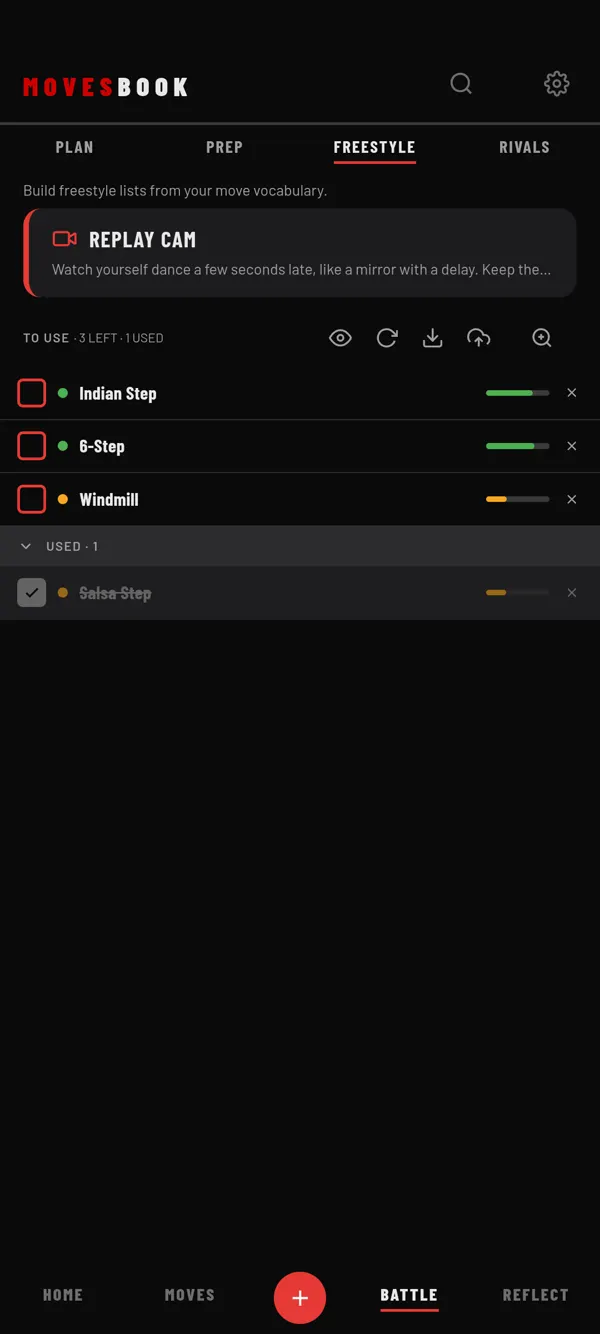
Steps
- Tap BATTLE, then FREESTYLE.
- Tap +. Add moves opens.
- Tick moves and sets from your library.
- Tap the button that reads, for example, ADD 5 SELECTED.
- Dance. Tick a move's box when you have thrown it. It moves down to USED.
The top line shows TO USE with how many are left and how many are used. Tap a ticked move's box again to put it back. Tap ✕ on a row to remove it. Long-press a row to reorder the list, then drag.
Trust Mode
Tap the eye icon at the top. The list is hidden. You only see how many moves are ready, and, if you keep any, one of your reminders from My Notes.
- Tap REVEAL to see the list for 5 seconds.
- Swipe right on the screen to tick off the next move.
- Tap the eye icon again to show the list.
Far view
Tap the zoom icon to make the list big enough to read from standing height, with the phone on the floor. The screen stays on while Far view is on, where the phone allows it. The size follows Settings › BEHAVIOUR › Battle view text size.
Save and load lists
- Upload icon: SAVE FREESTYLE LIST. Type a LIST NAME and tap SAVE LIST.
- Download icon: LOAD FREESTYLE LIST. Tap a list, then YES, LOAD.
- Refresh icon: RESET LIST, then RESET. This empties the list.
Last checked against app version 2.8.0.