Battles
Log a battle
- Free
Write down a battle you danced: the event, each round, who you faced, what you threw and how the judges voted.
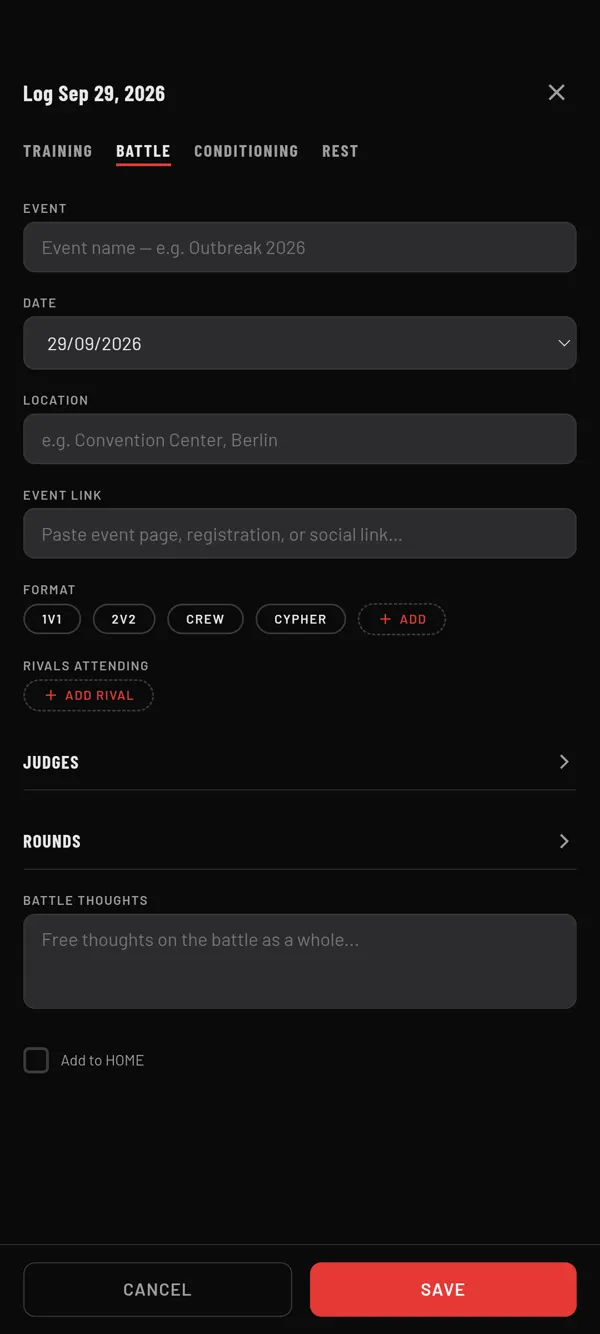
Steps
- On HOME, tap +, then Log Today.
- Tap the BATTLE tab.
- Type the EVENT name. It is the only field you must fill in.
- Check the DATE. Add LOCATION, EVENT LINK and a FORMAT if you want.
- Optional: under RIVALS ATTENDING, tap ADD RIVAL to pick people from your rivals.
- Optional: open JUDGES and set the judge count and names.
- Open ROUNDS and tap ADD ROUND for each round you danced.
- Tap SAVE.
You see "⚔️ Battle logged".
What a round holds
- ROUND NAME: pick one, like Top 16, or choose Custom...
- OUTCOME: WON or LOST
- NOTES for this round
- MEDIA: links, videos and photos. See Add battle videos round by round.
- OPPONENT: type a name, or tap the button to pick from your rivals
- ENTRIES: what you did in each entry. Tap + ENTRY to add one.
- MOVES USED: tap ADD to pick moves from your library
- JUDGE VOTES (when judges are set): tap each judge to cycle through won, lost and tie
At the end of the form, BATTLE THOUGHTS is for the battle as a whole.
From a rival's card
Open a person on BATTLE › RIVALS and tap ⚔️ LOG A BATTLE. They are already the first round's opponent.
Where it shows
- On HOME, as a tile on the battle's day. Tap it to see the result sheet.
- In My Book, on that month's page under "Battles and competitions".
- In a rival's BATTLE HISTORY, when a round's opponent is linked to them.
Last checked against app version 2.8.0.