Training
Spar 1 vs 1 with a friend
Take turns with a partner on one phone. Tap to switch turns, and the app times every round for both of you.
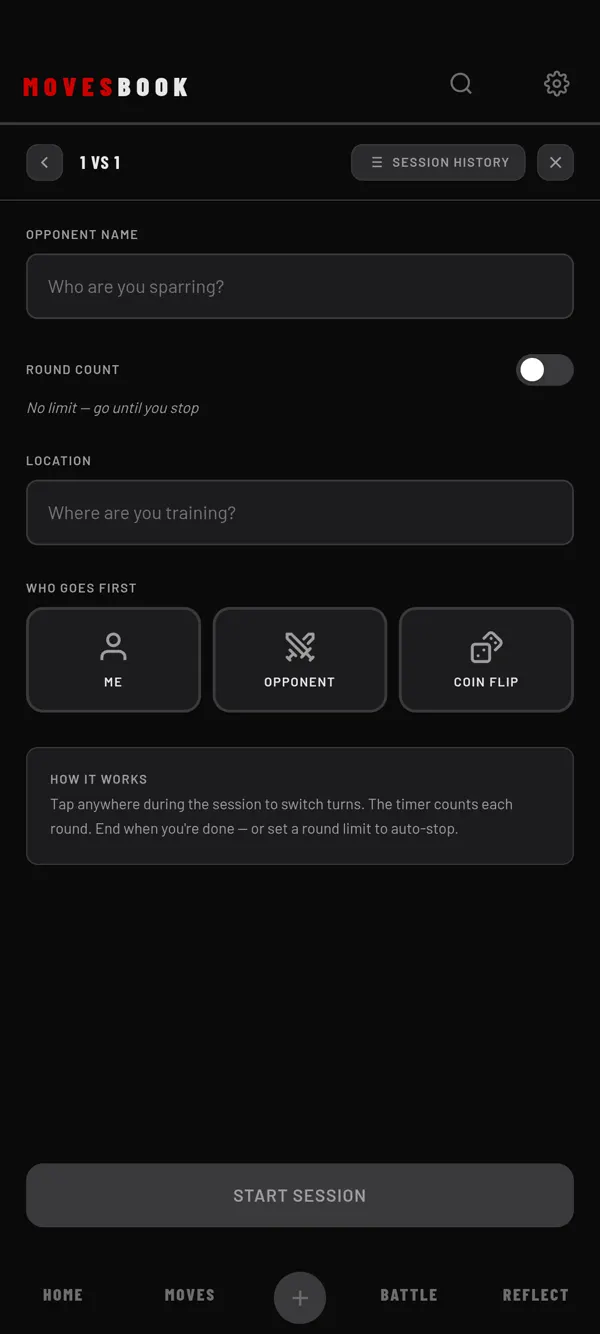
Steps
- Tap BATTLE, then RIVALS.
- Tap START SPAR.
- Tap 1 VS 1.
- Type your partner's name under OPPONENT NAME.
- Under WHO GOES FIRST, tap ME, your partner's name, or COIN FLIP.
- Tap START SESSION.
- When a turn ends, tap anywhere on the screen. The turn goes to the other dancer.
- Tap END SESSION, then END AND SAVE, when you are done.
- On the summary, tap SAVE.
The screen is red on your turn (YOUR ROUND) and blue on your partner's. A bell rings at each switch.
Set a number of rounds (optional)
Turn on ROUND COUNT and set 1 to 30 rounds. That is rounds each. When you reach it, you see TARGET REACHED. Tap KEEP GOING or END SESSION.
With ROUND COUNT off, there is no limit.
Pick a person you know
As you type the name, people from your Rivals, Sparring Mates and Crew show up. Tap one to link the session to them. You see LINKED. If you type again, the link goes.
A linked session is also saved on that person's page in RIVALS.
The summary
You see your rounds and theirs, both times, the longest round and each round. You can also write in JOURNAL.
- SHARE CARD makes an image of the session. Your journal text is on the card.
- SHARE SESSION sends a file your partner can import in MovesBook.
- ✕ DISCARD throws the session away.
Add your partner to your people
If the name is not linked, you see ADD TO YOUR PEOPLE? after saving. Tap ADD AS RIVAL, ADD AS SPARRING MATE, ADD AS CREW or SKIP.
On the free plan you can keep 3 people. The screen shows "2 of 3 people". Adding one more opens the plans sheet. Your session is already saved. See What's free and what Premium adds.
Last checked against app version 2.8.0.